Skip to content

Sourcing and purchase orders

Purchase order software that locks in the price you agreed.

Send RFQs, compare quotations side by side and raise the purchase order from the winning quote. The PO carries the agreed price, terms and delivery site, and goes to the supplier as a PDF.

What is purchase order software?

Purchase order software creates, sends and tracks the orders an organisation places with suppliers. Each PO records the items, quantities, agreed prices, terms and delivery location. Because the PO is the reference for checking deliveries and invoices, holding it in one system means the price agreed with a supplier is the price later used to approve payment.

How it works

Purchase orders, step by step.

  1. 01

    Start from an approved request

    Purchasing picks up an approved requisition, with its items, quantities, required date and budget code already filled in.

  2. 02

    Send RFQs

    Requests for quotation go to the suppliers you choose for the items on the request.

  3. 03

    Compare quotations side by side

    Supplier replies sit next to each other, so price and terms can be compared directly.

  4. 04

    Raise the PO from the winner

    The purchase order is raised from the chosen quotation. Its price, terms and delivery site come across without re-typing.

  5. 05

    Send the PDF to the supplier

    Bollard generates the PO as a PDF and sends it straight to the supplier. The order is then ready to receive against.

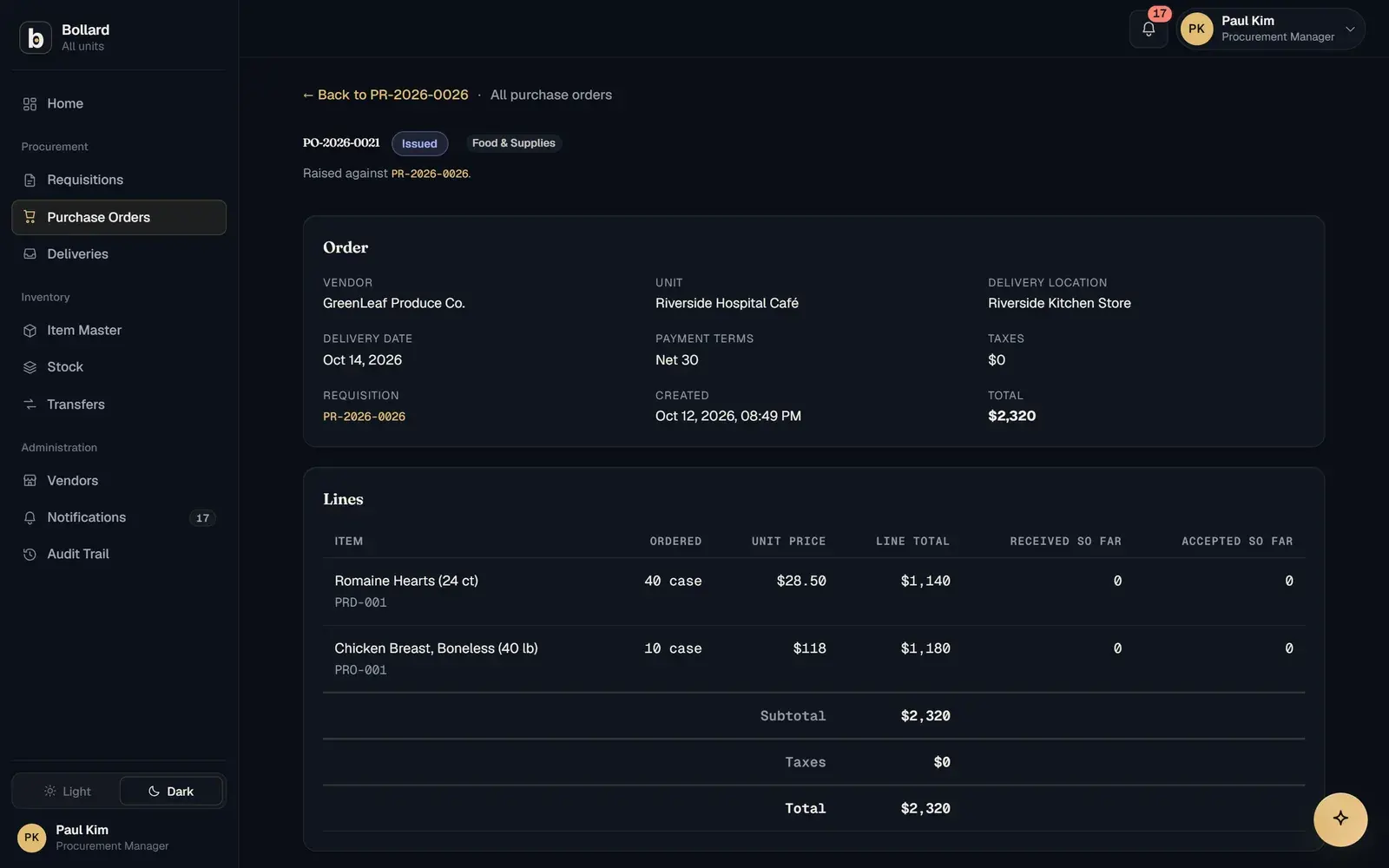
An issued purchase order with vendor, delivery location, terms and line prices.

What does purchase order software do?

Purchase order software turns an approved need into a commitment with a supplier and keeps that commitment as the reference for everything after. In Bollard, the PO records the agreed price, the terms and the delivery site, and that record is what receiving and invoice matching check against.

The PO is where price leakage can be stopped. If the agreed price lives in an email thread and the invoice arrives a month later, nobody can easily tell whether the supplier billed what was agreed. Locking the price on the PO gives finance a fixed number to hold the invoice to.

How do RFQs and supplier quote comparison work?

A request for quotation asks several suppliers to price the same items. Bollard sends the RFQs, collects the quotations and shows them side by side, so the buyer can choose one and raise the PO from it.

Comparing quotes is wasted effort if the winning price is then keyed into an order by hand. Raising the PO directly from the chosen quotation keeps the number that won the comparison as the number on the order.

Central buying helps too. In the education configuration, the central store pools faculty orders into bulk purchases. That targets a common problem in school and university groups: faculties paying different prices for the same items.

What types of purchase order does Bollard support?

Bollard has PO types for supplies, equipment and services. Each covers a different kind of spend, and the price lock applies to all three.

Supplies are the recurring consumables most sites order every week, such as lab glassware or sterile PPE kits. Equipment covers capital items, which many organisations track apart from consumables, as the education configuration does. Services cover work performed instead of goods delivered. In the construction configuration, plant hire is tracked from on-hire to off-hire, aimed at a familiar cost: hire still billed after the machine went off-hire.

Where does the purchase order sit between approval and receiving?

The PO is the fourth of seven steps: request, approve, source, order, receive, match and pay. It takes in an approved request and hands out the terms that the next two steps enforce.

The step before is approval. The request reaching purchasing has been through the chain set by amount, site and role, with every decision logged.

The steps after are receiving and three-way match. The store receives against the PO line by line, and the invoice is matched against the PO's prices and the accepted quantities. A supplier who bills above the PO price fails the match on value, and payment waits.

Why not raise purchase orders from a spreadsheet or an ERP?

A spreadsheet can produce a PO, but the agreed price is re-typed at each step, and a typical ERP often keeps the agreed price in a separate module. Bollard locks the price on the PO and carries that one figure through receiving and matching.

Re-typing is where small errors turn into overpayments. A price copied from a quote to an order to an invoice check has three chances to change. Spreadsheet POs also share everything: send the file and every site's orders go with it. Bollard keeps each site to its own records with row-level security, and the first site is live in about two weeks where an ERP takes months of implementation.

Questions

Common questions.

What information goes on a purchase order?

A purchase order normally lists the supplier, the items and quantities, the unit prices, the delivery location and date, and the payment and delivery terms. In Bollard the agreed price, terms and delivery site are fixed on the PO and used later, when the delivery is received and the invoice is matched.

Is a purchase order legally binding?

In many jurisdictions a purchase order becomes a binding contract once the supplier accepts it, by confirming the order or by delivering. The details depend on local law and your terms and conditions, so take legal advice for disputes. In practice, the PO is the record both sides refer back to when a delivery or invoice is questioned.

Can I compare supplier quotes before raising a PO?

Yes. Bollard sends RFQs to the suppliers you choose and shows their quotations side by side. You raise the purchase order from the winning quotation, so its price and terms move onto the PO without re-typing. Each step, from RFQ to issued order, is recorded in the audit trail.

How are purchase orders sent to suppliers?

Bollard creates each purchase order as a PDF and sends it straight to the supplier. The supplier gets the agreed items, prices, terms and delivery site in one document. Inside Bollard, the order is then open for the receiving site to record the delivery against when the goods arrive.

What is the difference between a purchase order and an invoice?

The buyer issues the purchase order before delivery, to commit to what will be bought and at what price. The supplier issues the invoice after delivery, to ask for payment. A three-way match checks the invoice against the PO and the goods receipt, so a price above the PO or a quantity above what was accepted is caught before payment.

Can Bollard raise purchase orders for services as well as goods?

Yes. Bollard has PO types for supplies, equipment and services, so recurring consumables, capital items and contracted work each go on the right kind of order. The agreed price, terms and delivery site are locked on every type, and each PO goes to the supplier as a PDF.

See Bollard set up for your operation.

Tell us how you buy and store today. We'll walk you through Bollard configured with your sites, roles and approval rules.

Book a demo
support@safock.com